
A focused class-booking concept
CoreLab is a Pilates class-booking concept developed for an interaction design course at Drexel. The project explores how someone could move from discovering a class to choosing a session, reviewing its details, and confirming a booking.
The work began with an analysis of Mindbody’s booking journey. I then developed a more focused studio concept, using wireframes and After Effects to explore how the interface changes between states.
The design question: how can motion help a person follow the booking journey without losing the context of the class they selected?
My role & scope
My course submissions include task flows, sketches, CoreLab wireflows, interaction guides, a Figma source file, and After Effects projects. The final work centers on UI, interaction design, and motion prototyping.
Deliverables: task flows, interface designs, interaction specifications, and AE motion demonstrations.
The animations demonstrate intended behavior. CoreLab was not a released app, and the payment sequence does not process transactions.
UX exploration / Start with the booking task
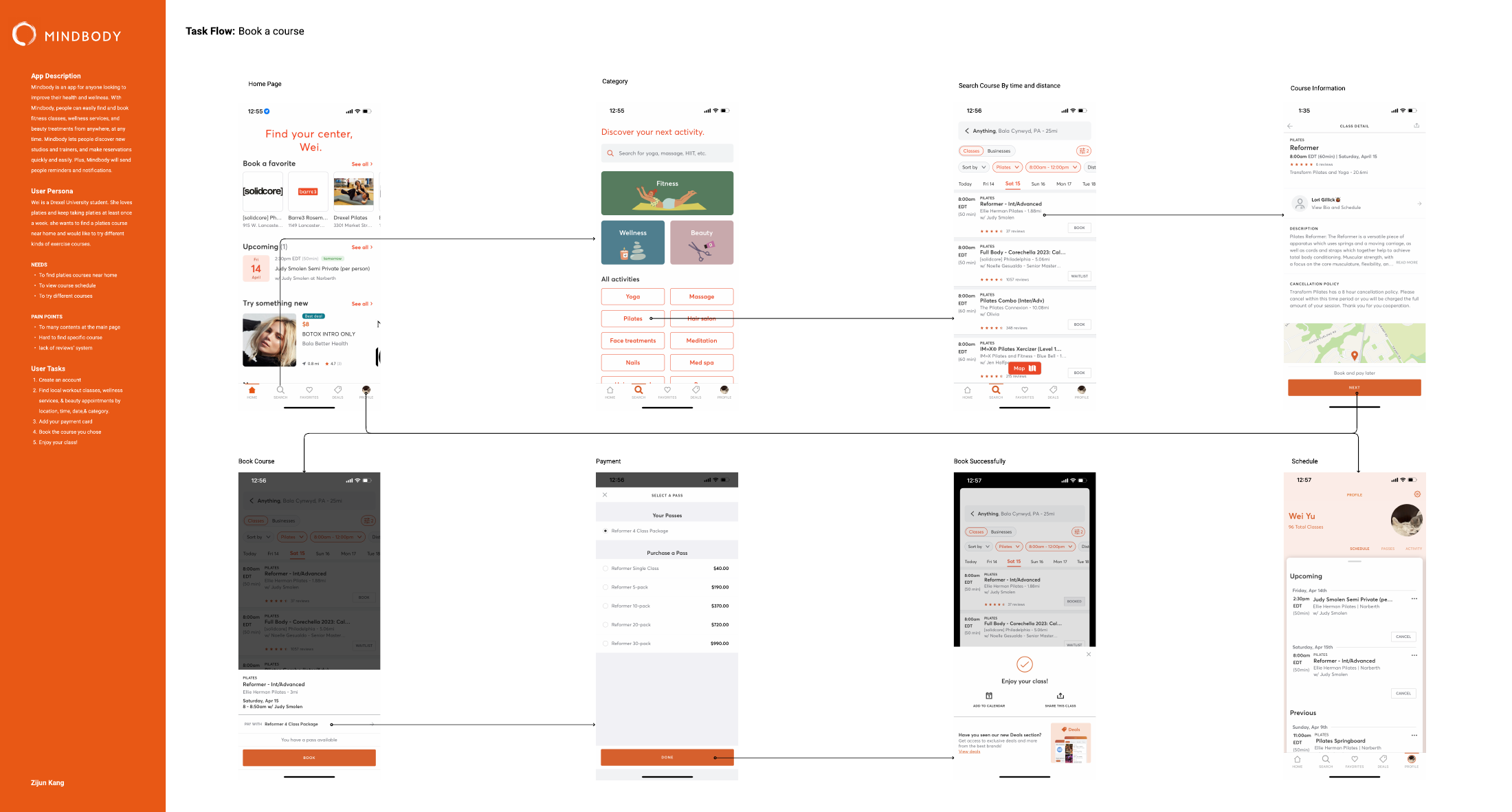
Before designing the animations, I mapped the steps involved in finding and booking a fitness class. The first course exercise used Mindbody as a reference and followed a journey from the home screen through category search, class details, payment, and confirmation.
My early analysis identified three concerns: a crowded home screen, difficulty finding a specific course, and limited review information. These were observations from the design exercise, rather than findings from a documented participant study.
A scenario to guide the design
The early task flow used Wei, a student looking for nearby Pilates classes, as its scenario. The later CoreLab materials used Jen, a busy professional fitting classes around her schedule. The profiles changed as the project moved toward a focused studio concept.
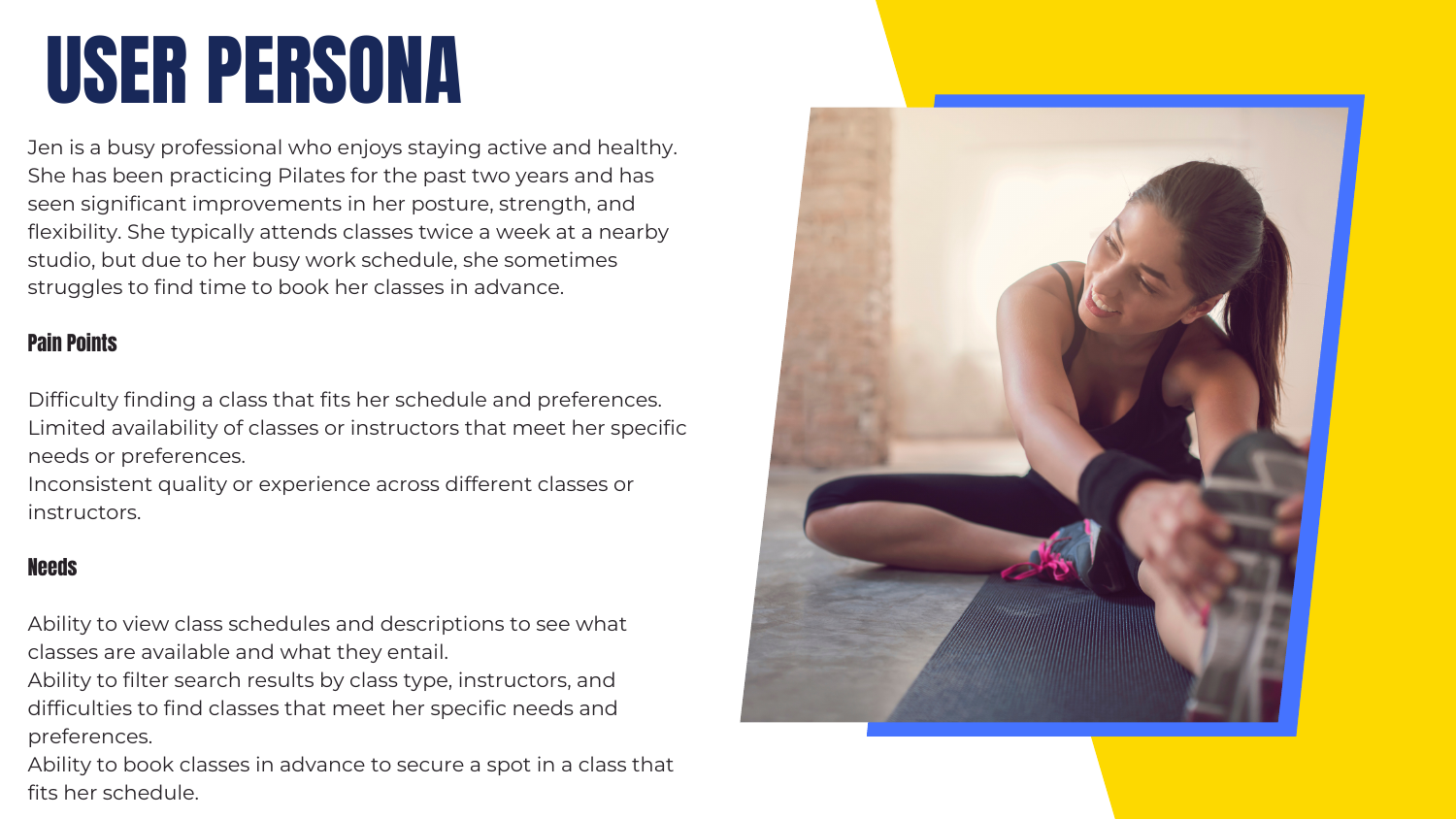
Find an appropriate class
Organize discovery around class type and difficulty.
Fit it into a schedule
Bring dates, start times, duration, and instructors into the schedule view.
Decide before booking
Connect a selected session to instructor and review information, then payment.
These needs shaped the intended hierarchy. They were design directions to evaluate, rather than evidence that the proposed interface had already solved the problems.
From task flow to moving interface
The first two weeks mapped a class-booking task in Mindbody: find a category, inspect a class, book, and move through payment. The early exercise identified a crowded starting point and difficulty finding a specific course as design concerns.
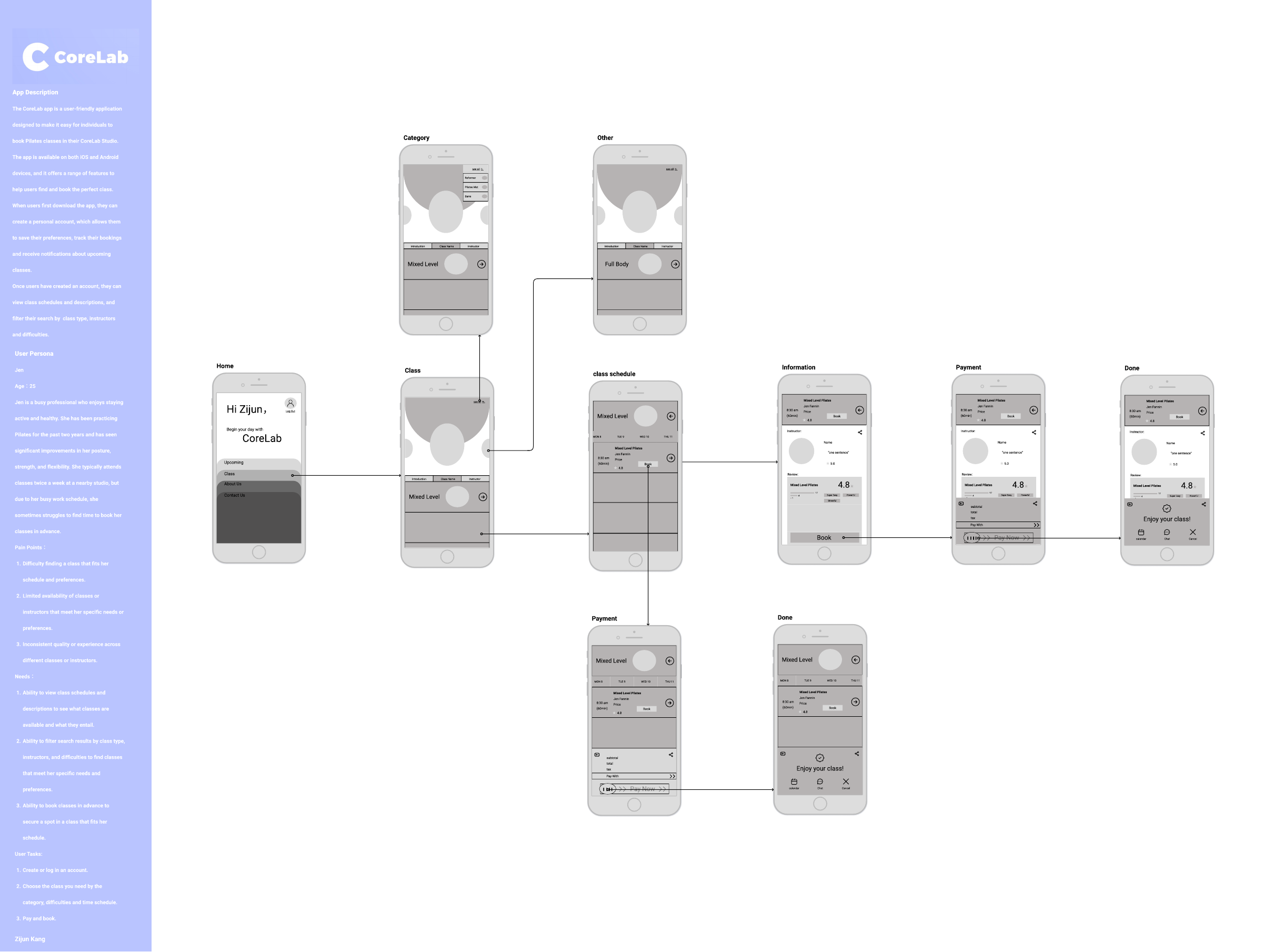
By the third-week wireflow, the work had become CoreLab. The focus narrowed to Pilates categories, difficulty levels, class schedules, and details. The course persona, Jen, represented a busy person trying to fit classes around her schedule; it served as a design scenario rather than a validated research finding.
- Map the task. Identify the screens and actions needed to select and book a class.
- Shape the interface. Organize categories, dates, instructors, and booking controls.
- Specify the interaction. Describe the trigger and feedback for each transition.
- Animate the sequence. Use After Effects to show how the states connect over time.
Motion design / Define the behavior before animating
Pilates characters / Created in Procreate
I created the Pilates characters in Procreate for the class-category screens. Their different exercise poses give each category a visual identity. I then used After Effects to explore how the category screens and interface states transition.

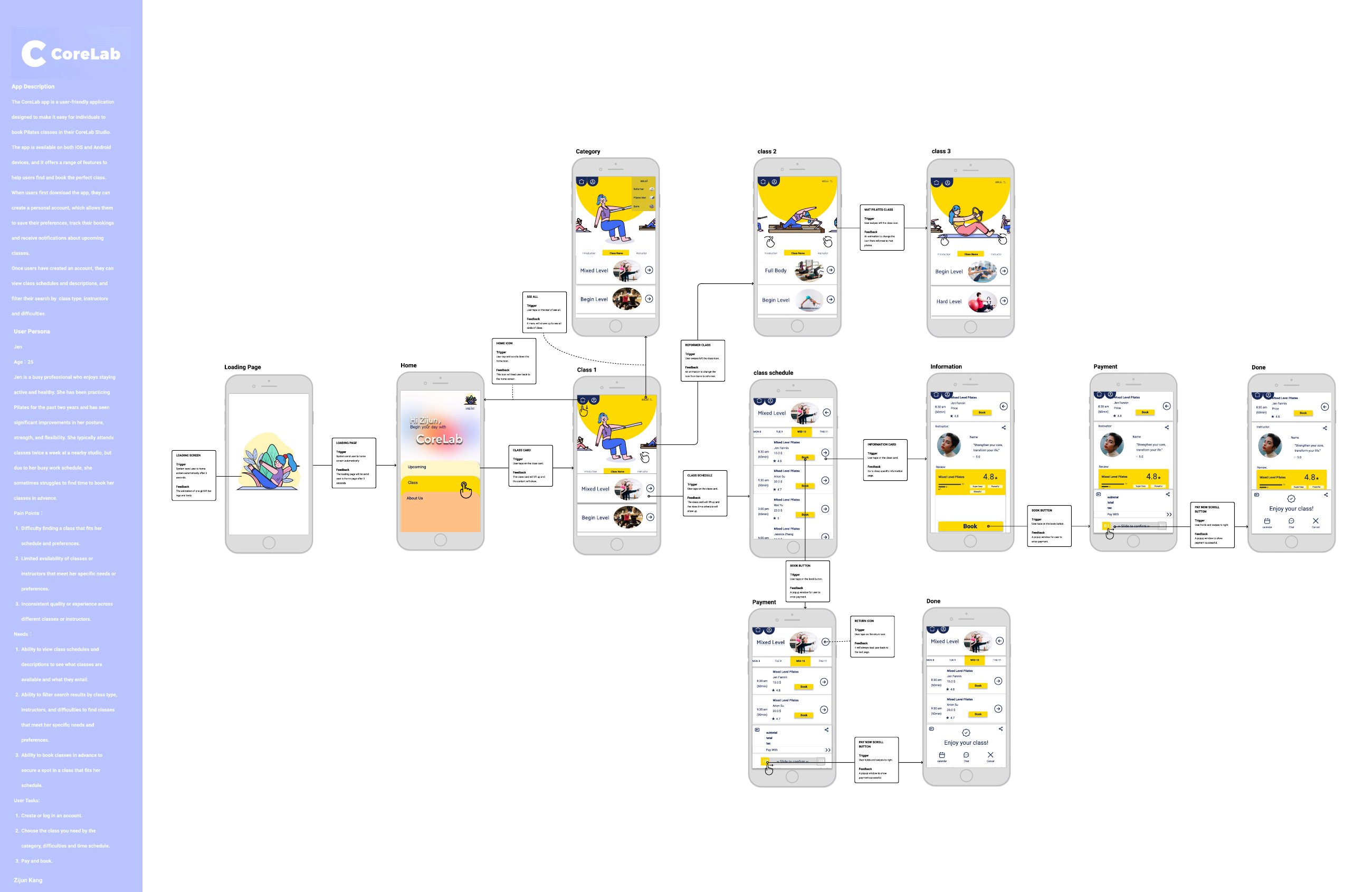
The wireflow established the sequence of screens. The interaction flow then added a more precise layer: what triggers a change, what moves or appears, and which state the interface reaches.
The interaction map below connects category browsing, card expansion, scheduling, details, and payment. Its trigger-and-feedback annotations served as a bridge between static interface design and the After Effects demonstration.
| Trigger | Planned response | Design intent |
|---|---|---|
| Swipe a class category | The category illustration changes. | Give browsing a visible response. |
| Tap a class card | The card lifts and reveals the next content. | Connect the selection to its schedule or details. |
| Tap Book | A payment panel appears. | Keep booking connected to the selected class. |
| Slide to confirm | The interface reaches a confirmation state. | Make the final action and its result distinct. |
In After Effects, I developed the visual transitions into a timed demonstration. The complete video at the top shows the sequence; the shorter GIFs below isolate individual interactions. The map describes intended behavior, while the rendered animation shows how that behavior was presented.
01 / Keep the selected class in context
The interface moves from class categories into a dated schedule and then to information about a selected session. The schedule brings time, duration, instructor, price, and a booking action together in a repeatable card.
The interaction guide describes cards lifting to reveal content and the selected card transitioning toward the top of a detail view. Keeping a recognizable element through the transition gives the sequence a visual connection.
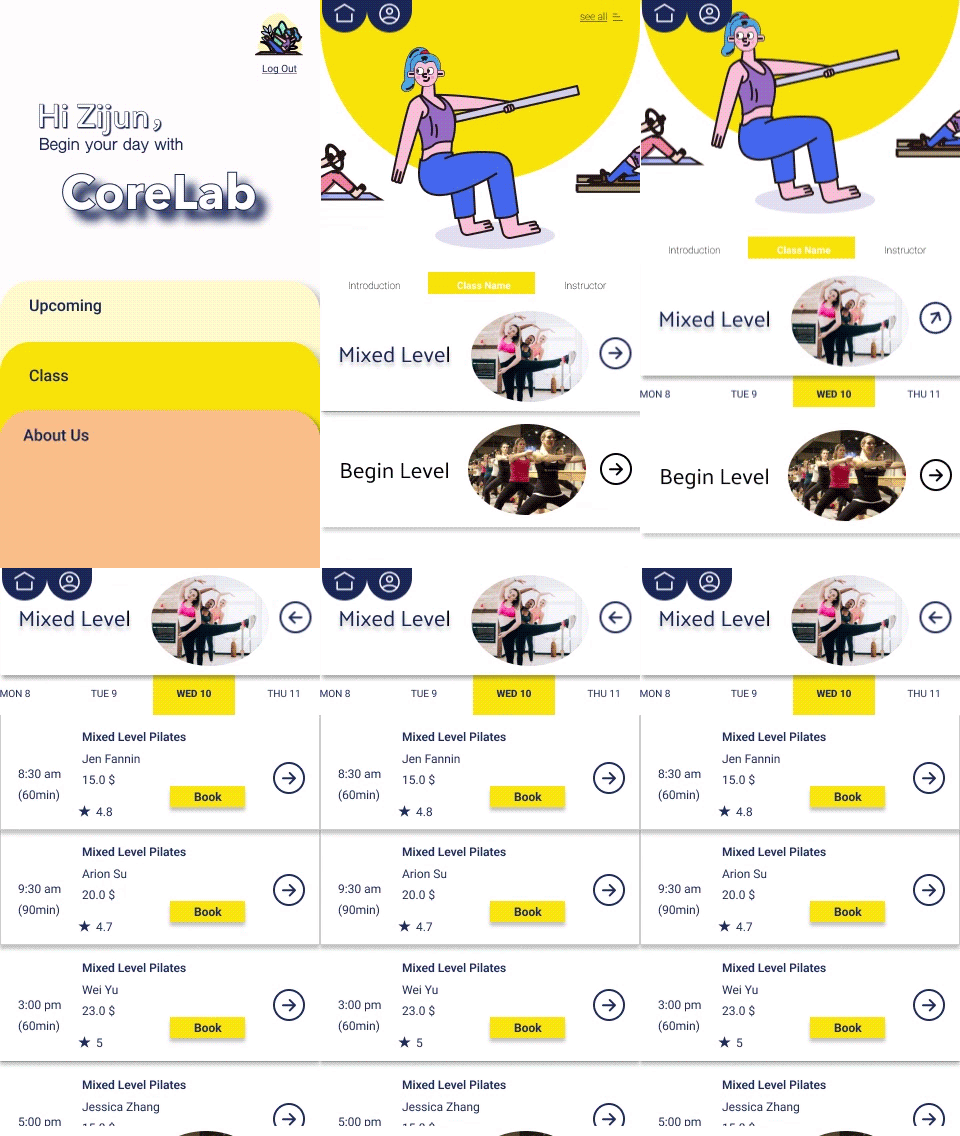
Original AE export · 5.85-second sequence. Watch how the card and schedule connect.
The trade-off: a moving card can connect states, but too much movement may delay access to the timetable. In a working prototype, I would compare it with a simpler transition and check whether people can still follow their selection.
02 / Make confirmation a distinct action
The booking sequence opens a payment area from the selected class. A slide-to-confirm control gives the final action a different gesture from the earlier taps used to browse and inspect classes.
The AE demonstration shows the control’s movement within the payment panel. This was a way to explore deliberate confirmation and visual feedback; it does not establish that sliding is safer or easier than a standard button.
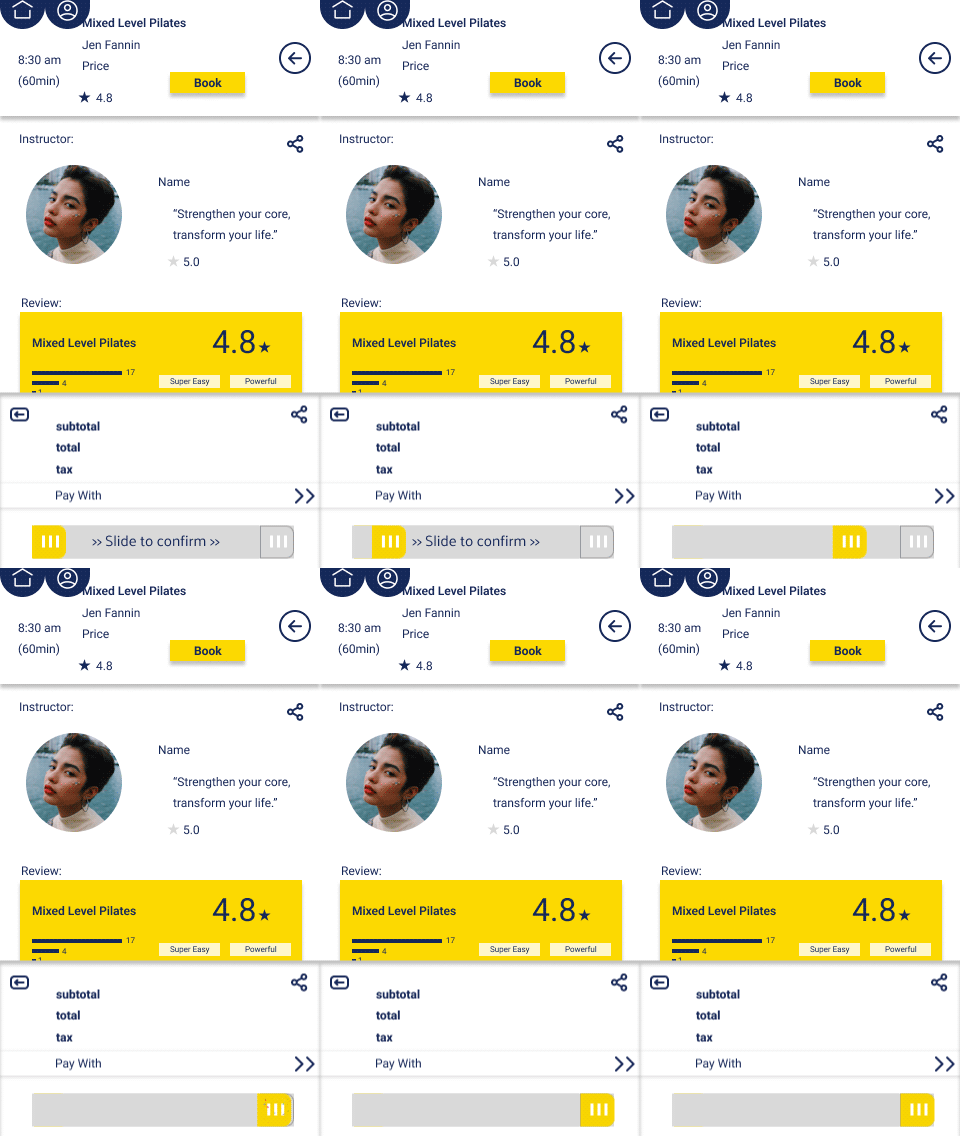
Original full-screen AE export · 2.73-second sequence.
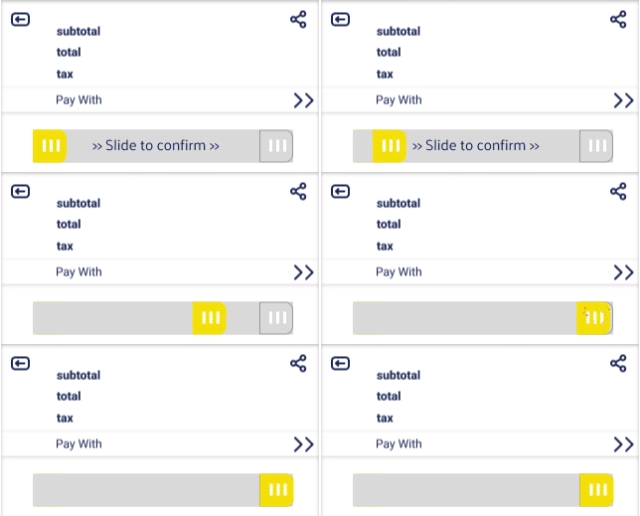
Original detail export · 2.73-second sequence.
The trade-off: a slide gesture can be less familiar and more demanding than tapping. A production version would need an accessible alternative, clear confirmation text, and tested error and recovery states.
03 / Give each animation a job
The interaction specifications describe triggers and feedback for category swipes, card expansion, details, sharing, and booking confirmation. This turns motion into an explicit part of the interface rather than an effect added at the end.
The work also includes a three-second animated entry screen. Looking back, I would keep that sequence optional or skippable: the studio’s personality should not slow down someone who already knows which class they want.
The most useful principle to carry forward is simple: preserve context during navigation, make an action’s result visible, and keep decorative movement brief.
Sharing / Reveal options in place
The final sequence shows the share control opening a row of social options beside it. The interaction guide describes the share icon rotating into a cancel symbol, giving the expanded state a visible way to close.
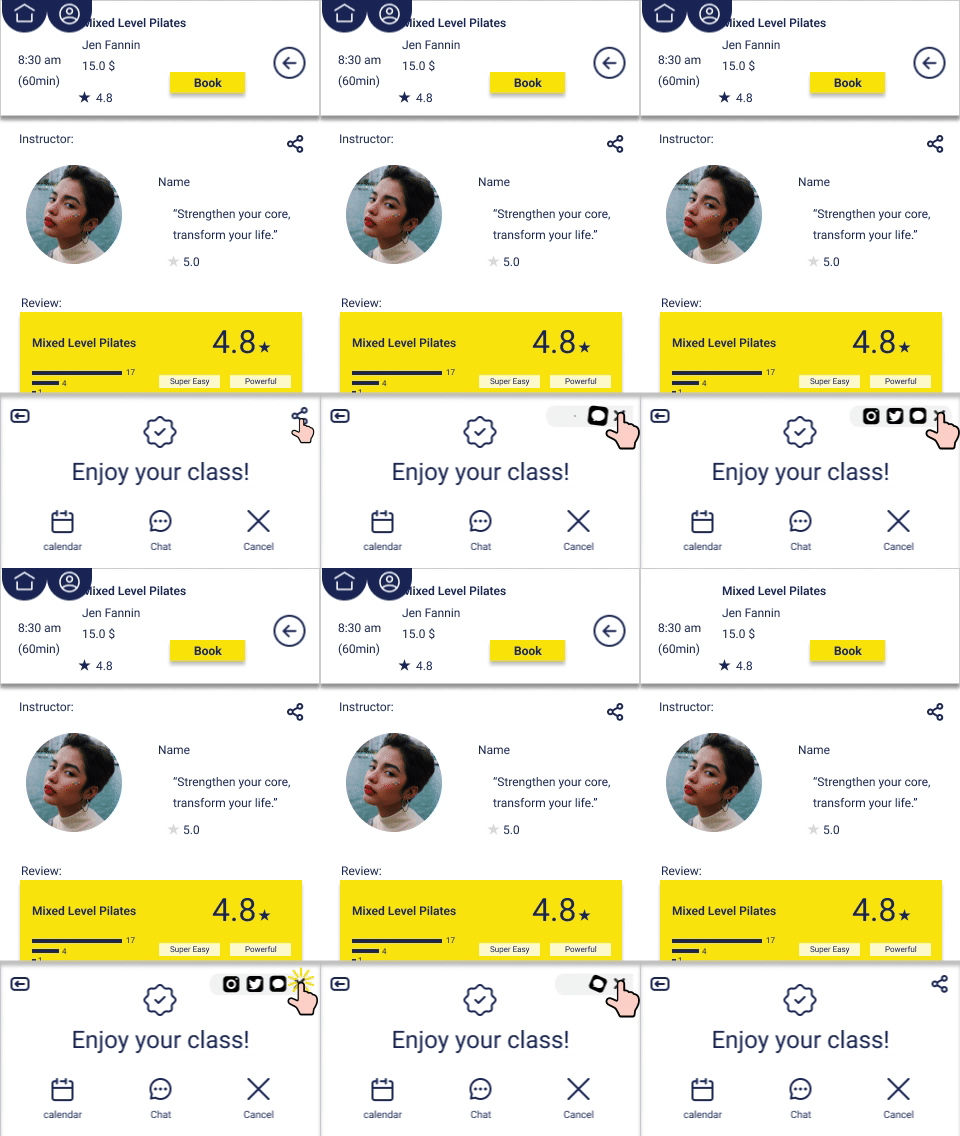
Extracted from the final 4.34 seconds of the original AE demonstration.
What the project produced
The final course submission combines interface designs, a documented booking flow, interaction guides, and an After Effects demonstration. The original GIFs shown here are preserved from that project.
This work demonstrates how I translate a static flow into a sequence of interface states. It also provides concrete decisions to evaluate: how a card opens, what remains visible during a transition, and how a booking is confirmed.
No verified usability results or booking metrics were found in the project records. Prices, ratings, and instructor details shown in the screens are example content.
What I would refine next
Test understanding before adding polish. Ask people to find a class, inspect its details, and explain what will happen when they confirm. Observe hesitation and backtracking across the same tasks.
Build a usable prototype alongside the motion study. An AE sequence communicates timing and visual intent, but cannot establish whether someone can discover the controls or recover from a mistake.
Plan for different ways of interacting. Offer reduced motion, keyboard access, and alternatives to gestures. Revisit contrast and text legibility in the actual interface.
CoreLab is an exploration of how motion can connect decisions in a booking journey. The next step would be to test whether those connections help people complete the task.